Animal Hospital Anomaly Identifier — Tell It What You Saw
Mid-shift and something feels wrong? Pick the channel where you noticed it — the patient, the clipboard photo, or the camera feed — and get every matching anomaly with the correct play. No scrolling an 18-row table while the timer runs.
Animal Hospital Anomaly Identifier
Mid-game and not sure? Pick where you noticed something off — get the matching anomalies and the correct play, instantly.
↑ Start by picking a channel. Rule of thumb: when in doubt, shutting the window is always safe — tasing a normal animal costs −15 sanity.
How to use the Animal Hospital anomaly identifier mid-shift
The tool is built around one question: where did you notice it? That question does most of the work, because most anomalies announce themselves on one channel in particular. Narrow by channel and you are choosing between three, seven or eight possibilities instead of the whole roster. A few do cross over — Staring is visible both in person and on CCTV, and Twitching is sometimes only visible on camera — so the channel narrows the list rather than settling it.
- Tap the channel.“In person” if the patient itself looked wrong, “On the photo” if the polaroid disagrees with what you can see, “On CCTV” if the feed shows something the window doesn't. There is a fourth button for the case where the shift simply won't end.
- Type a word or two if the list is long.The search box filters the channel's entries by name and by tell. On the eight camera anomalies, “eye” and “black” each cut it to two, and “ears” or “twitch” to one.
- Read the two lines it gives back. Tellis what you should be able to see right now — if it doesn't match, keep looking, you have the wrong entry. Playis the action, and it is not always “shut the window”: a few entries have a specific sequence attached.
One patient can match more than one entry. That is normal — traits stack, and a single confirmed tell on any channel is already enough to reject.
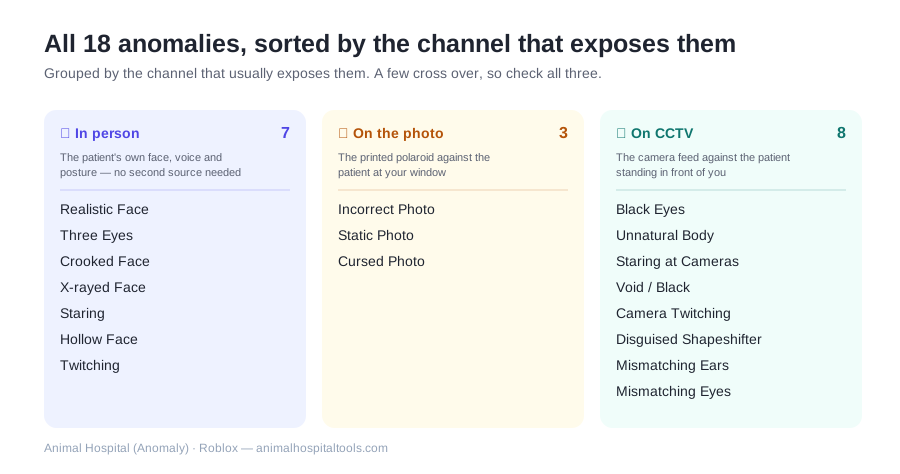
The three channels, and what you compare on each
The in-person channel is the only one you read on its own — the face, the voice, the way it stands. The other two are comparisons: the photo and the camera both give you a second version of the same patient, and the anomaly is the disagreement between them.
| Channel | Anomalies | What you're comparing |
|---|---|---|
| 👀 In person | 7 | The patient's own face, voice and posture — no second source needed |
| 📸 On the photo | 3 | The printed polaroid against the patient at your window |
| 📹 On CCTV | 8 | The camera feed against the patient standing in front of you |
Two extra entries in the tool aren't anomalies in their own right. A hunched, slouched idle posture is a cross-cutting tell — community field testing puts it at a Shapeshifter or an anomaly essentially every time — and the “shift won't end” entry is a situation rather than a creature.
All 18 anomalies and their tells
The same roster the identifier searches, laid out flat so you can skim it between shifts. Deeper write-ups for each one — including what happens if you admit it — live on the main wiki's anomaly guide.
| Anomaly | Channel | What gives it away |
|---|---|---|
| Realistic Face | In person | Big eyes, dark pupils, eye-bags, painted-on grin, low distorted voice |
| Three Eyes | In person | Three misplaced glowing-red eyes (original eyes sometimes visible underneath) |
| Crooked Face | In person | Warped tilted grin, sharp teeth, mismatched eyes sitting too high |
| X-rayed Face | In person | Small wide round eyes, black pupils, realistic teeth |
| Staring | In person | Head tracks you constantly (up to ~60° in person, unlimited on CCTV) |
| Hollow Face | In person | Pitch-black hollow eyes, twitching, hunched posture |
| Twitching | In person | Arm/head spasms, stretched neck, hunched back (sometimes camera-only) |
| Incorrect Photo | On the photo | Photo's eyes/ears/colors don't match the patient at the window (e.g. bunny ears in person, bear ears in photo) |
| Static Photo | On the photo | Polaroid covered in static grain |
| Cursed Photo | On the photo | The photo itself becomes a horror image (realistic eyes, warped grin, bleeding eyes…) |
| Black Eyes | On CCTV | Face covered by a black bar with realistic eyes staring at you |
| Unnatural Body | On CCTV | Body stretched/warped on camera; shape changes every time you toggle the feed |
| Staring at Cameras | On CCTV | Looks straight into the CCTV lens at all times, even while walking |
| Void / Black | On CCTV | Entirely pitch black on the camera feed |
| Camera Twitching | On CCTV | Twitches only in the camera feed, looks normal in person |
| Disguised Shapeshifter | On CCTV | Shows its true Shapeshifter form only on CCTV |
| Mismatching Ears | On CCTV | Ears/horns on camera don't match the patient at the window |
| Mismatching Eyes | On CCTV | Eyes on camera don't match the patient in front of you |
Rules the identifier assumes you already know
- Admitting an anomaly usually triggers a Death Ritual, spawns a monster, or leaves you with a Shapeshifter attacking patients and staff during recovery.
- Anomalies can't be knocked out — fainting and fire don't work on them. A wrong treatment kills them with no penalty but lowers your end-of-shift reward. The taser and gun both work.
- Tasing a confirmed anomaly is +2 sanity. Tasing or shooting a normal animal is −15 sanity — that gap is the entire reason to run a check instead of trusting a hunch.
- Staring and Twitching always turn into a Shapeshifter during recovery if you admit them, and Hollow Facealways triggers a Death Ritual. For those three, rejecting isn't the cautious option — it's the correct one.
- Since the June 22 update, a static photois no longer a guaranteed Shapeshifter tell. It's still an anomaly, but shoot-to-confirm can now just knock out a patient — shut the window instead.
When everyone's treated and the shift still won't end
If the “The doctor is coming” message never appears, one of the patients you cleared is an anomaly still sitting in the building. Re-check the ones you passed, in this order: idle posture first (it's the fastest read), then the photo, then CCTV. The camera pass is worth the seconds, because several camera tells leave the patient looking completely ordinary through the window — Black Eyes, Unnatural Body and Camera Twitching are all documented as camera-only.
The one anomaly worth catching before it reaches you is the Disguised Shapeshifter: it only shows its real form on camera, so the lobby feed gives you a side-on look while it's still walking in.
FAQ
How do I identify an anomaly in Animal Hospital?
Work by channel. Anomalies are grouped by where they usually give themselves away: on the patient themselves (in person), as a mismatch against the clipboard photo, or on the CCTV feed. Pick the channel where something felt off in the tool above and it lists every anomaly that appears there with its exact tell — then check the other two anyway, because a few show on more than one.
What should I do when I'm not sure a patient is an anomaly?
Check the channel, not your gut. Compare the patient against the clipboard photo first, then the CCTV feed. And remember the recurring characters — Ratthew, Liz and Officer Duckman look unusual but are never anomalies; rejecting them costs you.
Can one patient have more than one anomaly trait?
Yes. A single patient can stack several traits at once, which is why the identifier returns a list rather than a single answer — you may match two or three entries on the same patient. It does not change the play: one confirmed tell on any channel is already enough to shut the window.
Does rejecting a healthy patient hurt my score?
Shutting the window on a normal patient costs you the treatment reward for that patient — curing pays 2 Animal Coins where a block pays 0.5. What is documented as expensive is tasing or shooting a normal animal: that one is −15 sanity.
Is this identifier up to date?
It covers the current anomaly roster and is re-checked against our verified tells after each game update. The most recent event was The Hazmat Team Arrives, which opened on July 25, 2026 — see the main wiki's update tracker for what each patch changed.